
Find here Dell Inspiron 17R 5721 Bios Master password for Dell with System Disable, unlock Bios on Dell Laptop & Notebook with System Disable & service Tag under it.
All Dell Inspiron 17R 5721 system disable Bios master passwords are sent by e-mail, passwords will work 100% or your money back, Bios and HDD Passwords are sold separately, if Laptop has password set on Motherboard ( BIOS) and (HDD) two passwords will be required.
| How it works? When you turn on your Dell it will ask to: Enter Current password, as you don't have the current password, enter 3 wrong passwords to get the System Disable code and Sevice Tag to show as on the image below! 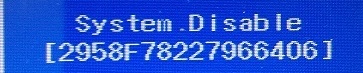
Once you have the Dell System Disable code shown on your Laptop screen, use this Stripe button below, pay via debit or credit card to get your bios master password! |
||
|---|---|---|
How To Unlock Bios on Dell Inspiron 17R 5721 with System Disable?You can Reset the Dell Bios password within bios setup |
||
| Get Dell system disable password by Link: | ||
| Tags: Dell Inspiron 17R 5721 system disable password, Dell Inspiron 17R 5721 Bios master password, enter current password Dell Inspiron 17R 5721 |
For Dell Inspiron 17R 5721 HDD Password please go to this Link:
Dell HDD Master Password from System Disable
Footer Banner Section
Open from 8:00 AM to 11:00 PM - NY Time Zone
From Monday through Monday
for any question or doubts, contact us via email at:
pcsecuritysupport2026
@gmail.com

Contact us
by whats app.
©2009 - biospro.com