
This password service will work to unlock Bios on Dell Inspiron, Alienware, XPS, Vostro & Optiplex.
All Dell system disable Bios master passwords are sent by e-mail, passwords will work 100% or your money back, Bios and HDD Passwords are sold separately, if Laptop has password set on Motherboard ( BIOS) and (HDD) two passwords will be required.
How to get the Dell System Disable master password?When you turn on your Dell it will ask to: Enter Current password, as you don't have the current password, enter 3 wrong passwords to get the System Disable code and Sevice Tag to show as on the image below! 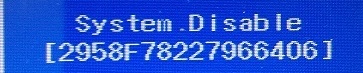
Once you have the Dell System Disable code shown on your Laptop screen, use this Stripe button below, pay via debit or credit card to get your bios master password! |
||
|---|---|---|
Get Bios password for Dell Laptop with System Disable, Supported models are Dell: Inspiron 3043, Inspiron 3138, Inspiron 3147, Inspiron 3148, Inspiron 3521, Inspiron 3531, Inspiron 3537, Inspiron 3721, Inspiron 3737, Inspiron 15 5565, Inspiron 15R 5520, Inspiron 15R 5521, Inspiron 15R 5537, Inspiron 15R SE 7520, Inspiron 17R 5737, Inspiron 17R 5721, Inspiron M531R 5535, Inspiron M731R 5735, Inspiron 5542, Inspiron 5545, Inspiron 5547, Inspiron 5548, Inspiron 5551, Inspiron 5447, Inspiron 7348, Inspiron 7347, Inspiron 7352, Inspiron 7558, XPS 12 9Q23, XPS 15 L521X, XPS 14Z L412Z, XPS 14 L421X, Alienware M11x R2, Alienware 14, Alienware M11x, Alienware M14x, Alienware M14x R2, Alienware M14x, Alienware M18x R2, Alienware 18, Alienware M17x R3, Alienware M17x R4, Alienware 17, Vostro 560, Vostro 3531, Vostro 7347, Vostro 15 3537, Vostro 15 3531, Vostro 3721, vostro 2521, Vostro 15 3521, Latitude 3540, Studio: Studio XPS 1647, OptiPlex: Optiplex GX1, Not all models are listed, if it does show system disable we can unlock it. |
||
How To Unlock Bios on Dell Laptop with System Disable?You can Reset the Dell Bios password within bios setup |
||
| Tags: dell system disable password, dell system disable Bios master password, enter current password dell |
For Dell System Disable HDD Password go to this Link:
Dell HDD Master Password from System Disable
Footer Banner Section
Open from 8:00 AM to 11:00 PM - NY Time Zone
From Monday through Monday
for any question or doubts, contact us via email at:
pcsecuritysupport2026
@gmail.com

Contact us
by whats app.
©2009 - biospro.com